#SML Blog Posts

DamaBanner
Community Data Modeling

Building Foundations with DAMA

When I switched careers into data, I jumped straight into tools and technologies. Looking back, I should have started with the DAMA Fundamentals course. It would have given me the conceptual foundation I was missing all along. A few years ago, when I first heard about citizen development, the pitch was simple: anyone can do […]

Intro to Git feature image
Version Control

An Introduction to Version Control with Git

The Ghost of Versioning Past Anyone that worked in a team setting 20 or more years ago has likely felt the pain of collaborating with others in the same file or same set of files at the same time. The outcome of these team projects frequently ended in a couple of different ways: Multiple copies

Bus Matrix Hero SML
Data Modeling

Un-Spaghetti Your Power BI Semantic Model

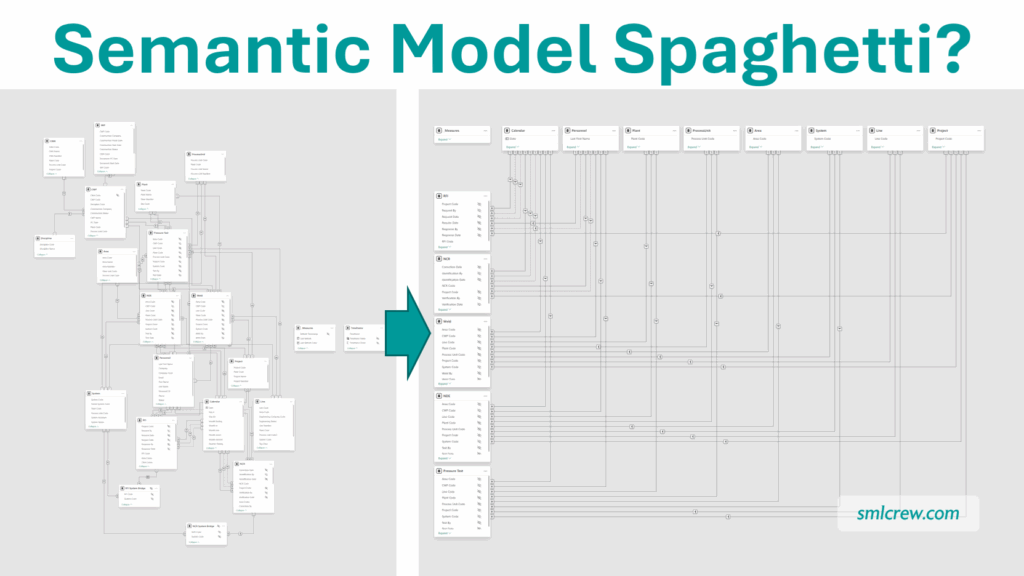
Does Your Power BI Semantic Model look like this? Power BI’s default Semantic Model layout is a little disorganized, to put it mildly. The tables are strewn in a haphazard manner, and the relationship lines are hard to follow. It takes some time to identify which tables are Facts or Dimensions, and even longer to

cartoon drawing of a bronze, silver, and gold medal side-by-side
Data Architecture

Medallion Architecture for Spreadsheet Ninjas

We have some of the coolest terms in the data space, which can be intimidating. Fortunately, many of them describe what I consider fairly basic things, and “medallion architecture” is one of those terms. What Is It? If you haven’t heard of the “medallion architecture” specifically yet, you may have heard others talking about their

LockIn Banner
Community

Starting the Year with Focus

Last year I heard this phrase, “The Great Lock-In,” and I don’t know, I started thinking about what it meant. The whole thing was straightforward, almost too straightforward. Focus through the end of the year. That’s it. No wandering off. No telling yourself you’ll start when the timing’s better. Just attention. Consistent, focused attention on

Picture of a microphone with blurred lights in the background and title "Data Storytelling".
Visualization

Storytelling in Power BI

When I first implemented Business Intelligence at our organization, the benefits were immediate. Users suddenly had 24/7 access to updated reports and trends—and we eliminated hours of manual report preparation. The technical gains were obvious from the start. What took longer to appreciate was the creative, softer side of BI: data storytelling. This is what

Self-service in Microsoft Power BI illustration with a cartoon man in a red baseball cap and blue shirt sitting at a desk with a laptop pointing to a monitor with visuals on it.
Self Service

Power BI Self-Service – Building the Models

In the first two posts of this series, we explored how organizations can empower users to consume and build reports using governed datasets. Now we turn to the most advanced—and potentially transformative—level of self-service BI: enabling users to build their own semantic models. This level offers maximum flexibility and ownership, but it also introduces the

Image
Visualization

Spice Up Bar Charts with Deneb

Deneb has made a significant impact in the Power BI visualization space since its introduction. Like Charticulator before it, Deneb provides a way for report creators to take advantage of the Vega and Vega-Lite libraries to build custom visuals. Additionally, you can save them as templates and reuse them. So, if you have a specific

StoryAI2
Story Telling

Data Stories in the Age of AI

Data storytelling still matters—arguably more than before. The craft is shifting from purely hand-built charts and meetings to a partnership where human judgment frames the narrative and AI accelerates exploration, drafting, and iteration. The skills that have always been at the core of strong stories—clarity, context, and domain knowledge—remain the foundation. AI changes the pace

Elimination
Visualization

The Power of Elimination

Designing Power BI Reports with Purpose: Explanatory, Not Exploratory One of the biggest challenges in creating Power BI reports is resisting the urge to overcomplicate them. The first question I always ask myself is: Is this report meant to be exploratory or explanatory? An exploratory report is for data enthusiasts like us—it’s where we dive

Self-service in Microsoft Power BI illustration with a cartoon man in a red baseball cap and blue shirt sitting at a desk with a laptop pointing to a monitor with visuals on it.
Self Service

Power BI Self-Service – Building Reports from a Semantic Model

In the first post of this series, we explored how interactive reports provide a safe and scalable entry point into self-service BI. Now, we take the next step: enabling users to build their own reports using semantic models. This level of self-service offers more flexibility and insight—but it also requires more structure, training, and governance.

Laptop on a glass desktop with a dashboard and data visuals.
Data Modeling

Data Modeling: Your Power BI Superpower

When you first start diving into the world of Power BI, it’s easy to get overwhelmed with all the different things you could be learning. You probably want to make stunning visuals and beautiful dashboards. Or geek out on the impressive calculations you can write with DAX. Or connect to and transform data from lots

Graphic showing the Microsoft Excel logo on the left and an arrow pointing to a Power BI yellow square with a bar chart and the label DAX.
DAX

From Excel to DAX

Learn from the Differences, Not the Similarities It’s common to compare Excel and Power BI—and understandably so. Both are powerful tools for analysis and reporting. Both serve analytical minds that are comfortable with formulas. And yes, many functions exist in both tools. But these similarities can also be misleading. While they provide a soft landing

Self-service in Microsoft Power BI illustration with a cartoon man in a red baseball cap and blue shirt sitting at a desk with a laptop pointing to a monitor with visuals on it.
Self Service

Power BI Self-Service – Interactive Reports

In today’s data-driven world, organizations are eager to empower their teams with self-service business intelligence (BI). But enabling self-service isn’t as simple as flipping a switch—it’s a journey that requires thoughtful planning, governance, and support.

This post kicks off a three-part series exploring the different levels of self-service BI. We begin with the most accessible and scalable entry point: interactive report consumption.

smloverview 84db350
Community

#SML is the rising tide

There is a proverb: If you want to go fast, go alone. If you want to go far, go together. I don’t know the origin of the proverb, but no doubt it came from a culture that recognizes and values the power of people working together. There seems to be no better time to talk

Scroll to Top